
No products in the cart.
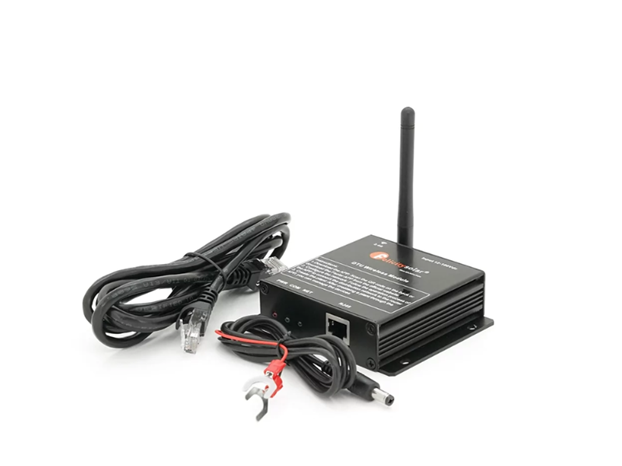
The Felicity Solar IOTH2407 Wireless Wi-Fi Module Dongle is an external 2.4 GHz Wi-Fi Data Transfer Unit (DTU) designed for remote monitoring and control of compatible Felicity Solar inverters and battery systems . It connects your solar hardware to the F-Solar mobile app and web portal for real-time tracking, fault alerts, and remote parameter adjustments.
Felicity Solar IOTH2407 Wireless Wi-Fi Module Dongle Key Specifications
- Connectivity. Operates on a 2.4 GHz Wi-Fi network with a data transmission rate of up to 300 Mbps .
- Interface & Power. Features an RJ45 / RS485 communication port and accepts a 12–100 VDC input power supply (typically wired directly to the battery bank or inverter terminals via the included power leads).
- Build & Durability. Housed in an IP65-rated waterproof ABS enclosure rated for operating temperatures between -20°C and 60°C .
- LED Indicators. Includes three status lights on the top panel (PWR , COM , and NET ) to confirm power, inverter communication, and cloud connectivity.
Felicity Solar IOTH2407 Wireless Wi-Fi Module Dongle Compatible Inverters
- IVEM Series. Works with off-grid/hybrid models including the IVEM3024, IVEM5048, IVEM6048, IVEM8048, and IVEM1048 .
- IVPS & IVPM Series. Compatible with Felicity’s low-frequency pure sine wave inverter lines via the communication port. (Note: Newer IP65 models like the IVAM or IVGM series typically use a direct plug-in Wi-Fi dongle rather than the wired IOTH2407 box.)
Quick Setup Overview
- Hardware Connection. Plug the included communication cable from the inverter’s RS232/RS485 port into the DTU’s RJ45 port, then connect the red and black power leads to the 12–100 VDC source (such as the battery terminals).
- App & Hotspot Pairing. Download the F-Solar App (via the QR code on the unit or the Felicitysolar User Guide ), open the network setup page, and connect your phone to the module’s local Wi-Fi hotspot (SSID starting with S followed by the last 10 digits of the serial number; default password 12345678 ).
- Router & Plant Creation. Select your local 2.4 GHz router inside the app to bind the module to the internet, verify that all three LEDs (PWR, COM, NET ) stay solidly lit, and add the device serial number to your plant dashboard.
Be the first to review “Felicity Solar IOTH2407 Wireless Wi-Fi Module Dongle”
Related products
DC Accessories
Price range: KSh3,000.00 through KSh3,300.00

DC Accessories
Price range: KSh1,300.00 through KSh6,500.00
DC Accessories
Price range: KSh5,500.00 through KSh9,500.00

DC Accessories
KSh13,500.00

DC Accessories
Price range: KSh5,000.00 through KSh19,000.00

DC Accessories
Price range: KSh3,500.00 through KSh5,500.00
DC Accessories
KSh1,250.00
DC Accessories
KSh4,000.00
Reviews
There are no reviews yet.