
No products in the cart.
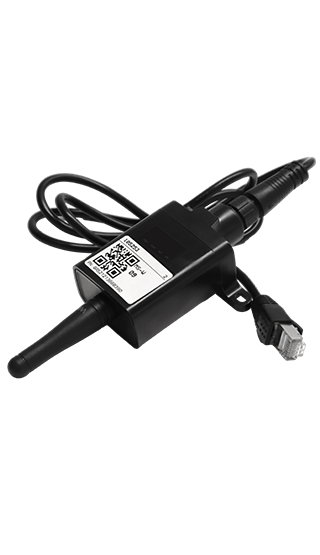
The SRNE Wi-Fi Wireless Plug / Dongle connects SRNE hybrid solar inverters and MPPT charge controllers to the internet for remote system tracking and adjustments .
SRNE Wi-Fi Wireless Plug / Dongle Core Specifications
- Frequency: 2.4 GHz only (5G bands are strictly unsupported).
- Interface Options: Four-pin aviation plug, standard RJ45 port, or TTL PH2.0 depending on your exact inverter model.
- Weather Resistance: IP65-rated waterproof casing for outdoor resilience.
Standard 3-Step Setup Guide
1. Hardware Connection
- Thread the module antenna onto the main body.
- Locate the Wi-Fi or RS485 port on your powered-on SRNE inverter.
- Plug the cable in securely; the PWR indicator light on the dongle should instantly illuminate.
2. Local Access Setup
- Download the official SmartESS or Smart S monitoring app from the Apple App Store or Google Play.
- Go to your smartphone’s Wi-Fi network settings.
- Connect directly to the dongle’s local hotspot (it usually begins with
AP_or the dongle’s Product Number). - Use the default hotspot password:
12345678.
3. Network & Cloud Registration
- Open your app, find the Toolbox or System Settings , and select Wi-Fi Config .
- Choose your home/facility 2.4GHz Wi-Fi router network, enter your router password, and save.
- Create an app account, click the “+” icon on your dashboard, and scan the QR barcode sticker on the front of the dongle to bind it to your cloud profile
Be the first to review “SRNE Wi-Fi Wireless Plug / Dongle”
Related products
DC Accessories
KSh3,000.00
DC Accessories
Price range: KSh2,000.00 through KSh8,500.00

DC Accessories
Price range: KSh5,000.00 through KSh19,000.00
DC Accessories
Price range: KSh3,000.00 through KSh3,300.00

DC Accessories
Price range: KSh1,300.00 through KSh6,500.00

KSh12,000.00

DC Accessories
DC Accessories
KSh1,250.00
Reviews
There are no reviews yet.